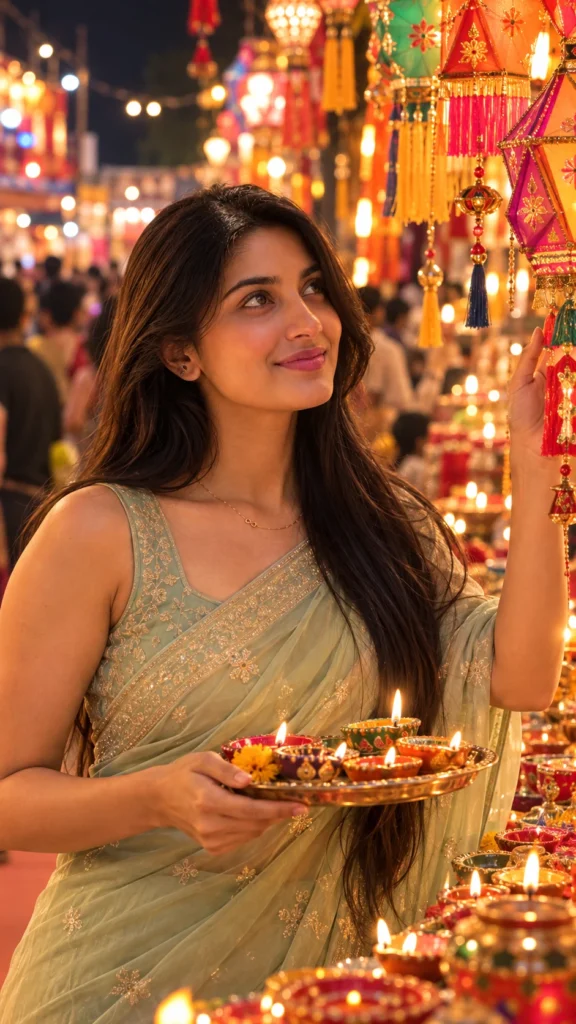
Pastel Green Saree Diwali Market AI Photo Prompt for Girls
Copy this prompt below and paste it into ChatGPT with your own photo.
नीचे दिया गया प्रॉम्प्ट कॉपी करें और अपनी फ़ोटो के साथ ChatGPT में पेस्ट करें।
નીચે આપેલ પ્રોમ્પ્ટ કૉપિ કરો અને તમારા ફોટા સાથે ChatGPT માં પેસ્ટ કરો.
Ultra-realistic 8K portrait photo (9:16 ratio) of a young woman whose face perfectly matches the reference image (100% identical facial features, with natural skin and hair details). She is dressed in a pastel green saree with minimal jewelry, standing in a lively Diwali street market at night. Holding a diya plate in one hand, she gazes up at the colorful paper lanterns hanging above the stall with a soft, warm smile. The scene is illuminated by glowing lights, candles, and rich bokeh effects in the background. Warm golden tones and natural reflections make the image appear entirely real and cinematic — like a professional lifestyle photoshoot.
Best with: ChatGPT
सबसे अच्छा चलता है: ChatGPT
સૌથી સારું ચાલે છે: ChatGPT
How to use this photo prompt
- Tap Copy prompt above to copy the full text.
- Open ChatGPT and start a new chat.
- Upload the photo you want to transform.
- Paste the prompt and send it.
- If the first result is not quite right, regenerate once or twice — small changes in wording shift the style a lot.
Tips for a better result
- Mind the background. It replaces your backdrop with an outdoor setting — a source photo with a plain or blurred background swaps over most cleanly.
- Shoot for the crop. The output is a vertical 9:16 frame, so leave headroom in your original rather than filling the frame.
- Try it twice. Image models are random — a second run often looks noticeably better.
- Start from the highest-resolution copy you have. Detail the model can see is detail it can keep.
- Crop before you generate. Removing clutter from the edges usually beats asking the model to remove it.
Who this festival prompt suits
This one works especially well for Girls. It suits Instagram posts, profile pictures, and WhatsApp display photos, and it holds up on both phone and desktop screens.
More prompts like this
How to use this prompt
- Tap Copy prompt above to copy the full text.
- Open ChatGPT and start a new chat.
- Upload the photo you want to transform.
- Paste the prompt and send it.
- If the result is not right, regenerate once or twice. Small wording changes shift the style a lot.
Tips for a better result
- Use a clear, high-resolution source photo.
- Leave some headroom if the prompt asks for a vertical frame.
- Try twice. Image models give different results each time.
इस प्रॉम्प्ट का उपयोग कैसे करें
- पूरा टेक्स्ट कॉपी करने के लिए ऊपर Copy prompt पर टैप करें।
- ChatGPT खोलें और नई चैट शुरू करें।
- जिस फ़ोटो को बदलना है उसे अपलोड करें।
- प्रॉम्प्ट पेस्ट करें और भेज दें।
- रिज़ल्ट सही न लगे तो एक-दो बार दोबारा जनरेट करें। शब्दों में छोटा बदलाव भी स्टाइल बदल देता है।
बेहतर रिज़ल्ट के लिए टिप्स
- साफ़ और हाई-रेज़ोल्यूशन फ़ोटो इस्तेमाल करें।
- अगर प्रॉम्प्ट वर्टिकल फ़्रेम माँगता है तो ऊपर थोड़ी जगह छोड़ें।
- दो बार आज़माएँ। इमेज मॉडल हर बार अलग रिज़ल्ट देते हैं।
આ પ્રોમ્પ્ટનો ઉપયોગ કેવી રીતે કરવો
- આખો ટેક્સ્ટ કૉપિ કરવા માટે ઉપર Copy prompt પર ટૅપ કરો.
- ChatGPT ખોલો અને નવી ચેટ શરૂ કરો.
- જે ફોટો બદલવો છે તે અપલોડ કરો.
- પ્રોમ્પ્ટ પેસ્ટ કરો અને મોકલો.
- જો પરિણામ બરાબર ન લાગે તો એક-બે વાર ફરી જનરેટ કરો. શબ્દોમાં નાનો ફેરફાર પણ સ્ટાઇલ બદલે છે.
વધુ સારા પરિણામ માટે ટિપ્સ
- સ્પષ્ટ અને હાઈ-રિઝોલ્યુશન ફોટો વાપરો.
- જો પ્રોમ્પ્ટ વર્ટિકલ ફ્રેમ માંગે તો ઉપર થોડી જગ્યા છોડો.
- બે વાર અજમાવો. ઇમેજ મૉડલ દર વખતે અલગ પરિણામ આપે છે.
See all prompts in Festival Prompts →
October 26, 2026