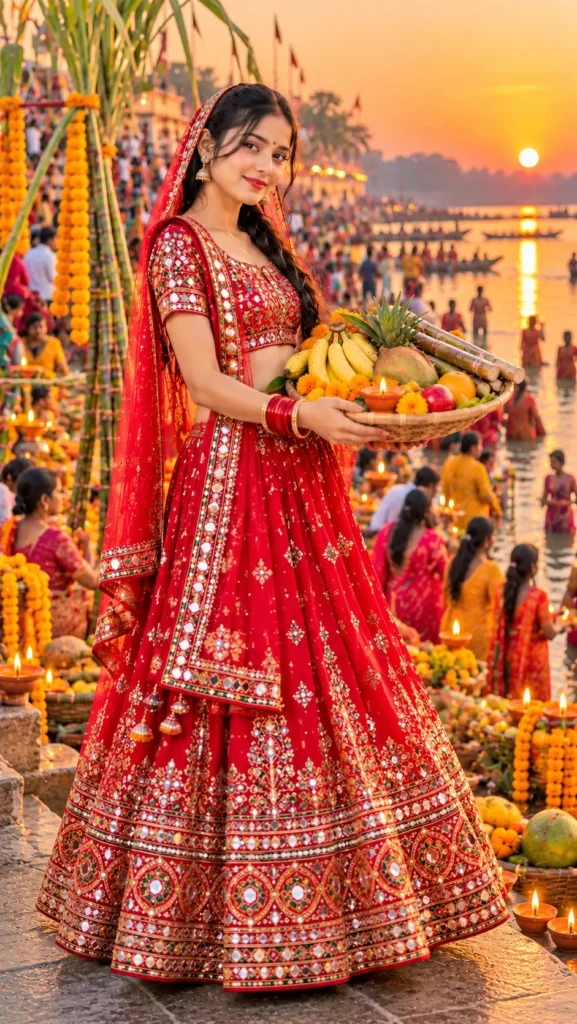
Chhat Ghar AI Image Prompt 2026
Follow on InstagramInstagram पर फ़ॉलो करेंInstagram પર ફૉલો કરો
Copy this prompt below and paste it into Gemini with your own photo.
नीचे दिया गया प्रॉम्प्ट कॉपी करें और अपनी फ़ोटो के साथ Gemini में पेस्ट करें।
નીચે આપેલ પ્રોમ્પ્ટ કૉપિ કરો અને તમારા ફોટા સાથે Gemini માં પેસ્ટ કરો.
Create an ultra-realistic, HD DSLR-style full-body portrait using my uploaded photo as the face reference. Preserve my original facial features, skin tone, and identity. Make me look youthful, attractive, and natural. Dress me in a gorgeous **deep red ghagra choli with intricate golden embroidery and traditional mirror work**, a beautifully flared lehenga, a matching embroidered choli, and a red dupatta draped gracefully over my head and shoulders. Add elegant traditional earrings, bangles, a small red bindi, and a subtle festive makeup look.

Show me standing gracefully at a **crowded Chhath Puja ghat beside a river during sunset**, holding a traditional bamboo basket filled with bananas, coconuts, sugarcane, fresh fruits, marigold flowers, and a glowing diya.

**Background:** A realistic Chhath Puja ghat with hundreds of devotees in colorful traditional clothing, women offering arghya to the setting sun, decorated bamboo baskets, sugarcane stalks, marigold garlands, glowing earthen lamps, boats on the river, and golden sunlight reflecting on the water. Make the crowd and rituals clearly recognizable while keeping the main subject in sharp focus.

**Photography:** Professional DSLR photography, natural skin texture, highly detailed mirror work, realistic fabric folds, cinematic golden-hour lighting, vibrant colors, sharp facial focus, and natural depth of field.

**Composition:** Complete full-body view from head to toe, showing the entire ghagra choli, flared lehenga, dupatta, and footwear. Vertical **9:16 aspect ratio**, high resolution, photorealistic quality.

Keep my identity as close to the uploaded photo as possible. Avoid distorted hands, extra fingers, cropped feet, artificial facial features, text, logos, and watermarks.
Best with: Gemini
सबसे अच्छा चलता है: Gemini
સૌથી સારું ચાલે છે: Gemini
Want to create a beautiful and traditional Chhath Puja photo in a red ghagra choli? With AI image editing tools like Google Gemini, you can transform your ordinary photograph into a stunning, realistic festive portrait using your own face.
This Chhath Puja AI Photo Editing Prompt in Red Ghagra Choli creates a traditional look featuring intricate golden embroidery, sparkling mirror work, a matching dupatta, and elegant jewelry. The crowded riverside ghat, colorful devotees, glowing diyas, and beautiful sunset create a vibrant Chhath Puja atmosphere.
How to Create Your Chhath Puja AI Photo
Follow these simple steps to generate your personalized image:
- Open Google Gemini or another AI image editing tool that supports photo uploads.
- Upload a clear photograph of yourself.
- Copy the prompt provided above.
- Paste the prompt into the AI tool and generate your image.
- Review the result and save your favorite portrait.
Customize Your Ghagra Choli Look
You can experiment with different outfit colors and embroidery styles to create a unique festive appearance. Red with golden embroidery and mirror work offers a traditional look, while royal blue, green, or maroon can give your portrait a different style.
For the background, choose a busy Chhath Puja ghat with devotees offering arghya to the setting sun, traditional bamboo baskets, sugarcane decorations, and reflections on the river.
The 9:16 vertical image ratio is ideal for WhatsApp Status, Instagram Stories, and Reels covers. A full-body composition helps display the entire ghagra choli, flared lehenga, dupatta, and footwear.
Tips for Realistic AI Photo Results
- Use a clear, high-quality reference photograph.
- Keep your facial features and identity-preservation instructions in the prompt.
- Specify full-body framing to avoid cropping the outfit.
- Include detailed descriptions of mirror work, embroidery, and lighting.
- Generate another version if the face, hands, or clothing look unnatural.
AI-generated results may vary, and exact facial preservation is not guaranteed.
Conclusion
The Chhath Puja AI Photo Editing Prompt in Red Ghagra Choli makes it easy to create a beautiful traditional portrait without arranging a professional photoshoot. Upload your photo, use the prompt above, and create a festive look to share with your friends and family.
How to use this prompt
- Tap Copy prompt above to copy the full text.
- Open Gemini and start a new chat.
- Upload the photo you want to transform.
- Paste the prompt and send it.
- If the result is not right, regenerate once or twice. Small wording changes shift the style a lot.
Tips for a better result
- Use a clear, high-resolution source photo.
- Leave some headroom if the prompt asks for a vertical frame.
- Try twice. Image models give different results each time.
इस प्रॉम्प्ट का उपयोग कैसे करें
- पूरा टेक्स्ट कॉपी करने के लिए ऊपर Copy prompt पर टैप करें।
- Gemini खोलें और नई चैट शुरू करें।
- जिस फ़ोटो को बदलना है उसे अपलोड करें।
- प्रॉम्प्ट पेस्ट करें और भेज दें।
- रिज़ल्ट सही न लगे तो एक-दो बार दोबारा जनरेट करें। शब्दों में छोटा बदलाव भी स्टाइल बदल देता है।
बेहतर रिज़ल्ट के लिए टिप्स
- साफ़ और हाई-रेज़ोल्यूशन फ़ोटो इस्तेमाल करें।
- अगर प्रॉम्प्ट वर्टिकल फ़्रेम माँगता है तो ऊपर थोड़ी जगह छोड़ें।
- दो बार आज़माएँ। इमेज मॉडल हर बार अलग रिज़ल्ट देते हैं।
આ પ્રોમ્પ્ટનો ઉપયોગ કેવી રીતે કરવો
- આખો ટેક્સ્ટ કૉપિ કરવા માટે ઉપર Copy prompt પર ટૅપ કરો.
- Gemini ખોલો અને નવી ચેટ શરૂ કરો.
- જે ફોટો બદલવો છે તે અપલોડ કરો.
- પ્રોમ્પ્ટ પેસ્ટ કરો અને મોકલો.
- જો પરિણામ બરાબર ન લાગે તો એક-બે વાર ફરી જનરેટ કરો. શબ્દોમાં નાનો ફેરફાર પણ સ્ટાઇલ બદલે છે.
વધુ સારા પરિણામ માટે ટિપ્સ
- સ્પષ્ટ અને હાઈ-રિઝોલ્યુશન ફોટો વાપરો.
- જો પ્રોમ્પ્ટ વર્ટિકલ ફ્રેમ માંગે તો ઉપર થોડી જગ્યા છોડો.
- બે વાર અજમાવો. ઇમેજ મૉડલ દર વખતે અલગ પરિણામ આપે છે.
See all prompts in Uncategorized →
October 29, 2026